LizPilot Manual
The phone panel for openpilot on the Haval H6 GT. For the driver and for whoever rides along.
Channel version 516d695 · November 2026. The pictures use test data.
- What it isWhat it does and what it doesn't
- Install and pairQR, code and home screen
- HomeComma ok, numbers and last trip
- Trips and MissionsHistory, tests and route
- Copilot modeFor the passenger
- Mark, Spots and SettingsWhat each one does
- The copy on the phoneWhat stays on it
- SafetyOn one page
- Common problemsWhat to do when something goes wrong
1 · What it is
The car's panel on your phone
LizPilot is a page that the comma itself opens on your phone, over the local network. It shows what openpilot is doing and keeps the history of your drives.
What it does
- With the car moving: who is steering, the ACC, the next speed camera or bump, the car ahead and the position in the lane.
- With the car stopped: trips, numbers from the last weeks, Missions and marks.
- Turns the LizPilot options on and off and updates the comma, always with the car stopped.
What it doesn't do
- While the car moves, the phone changes nothing in the car. Steering and speed settings are read only.
- It doesn't talk to the internet. Only phones on the comma's network open the panel.
- It doesn't weigh on the steering: if the panel goes down, openpilot keeps driving.
- Missions, levels and seals unlock nothing in the car.
- It doesn't take away your responsibility: making sure the car stops is up to you.
2 · Install and pair
Just once
The LizPilot page on the comma's own screen is in Portuguese (the comma 4 has no language menu). Its labels are shown here in italics.
- On the comma: Settings → LizPilot. Turn on phone panel (painel no celular). This option can only be changed on the comma.
- Tap pair phone (parear celular). The comma shows a QR and a 6-digit code, valid for 2 minutes.
- Put the phone on your home Wi-Fi (the same as the comma's) or on the comma's hotspot. Point the camera at the QR.
- Type the code. The phone pairs by itself at the 6th digit. Give it a name, like “iPhone”.
- Add it to the home screen. iPhone: Share → Add to Home Screen. Android: menu ⋮ → Add to Home screen.
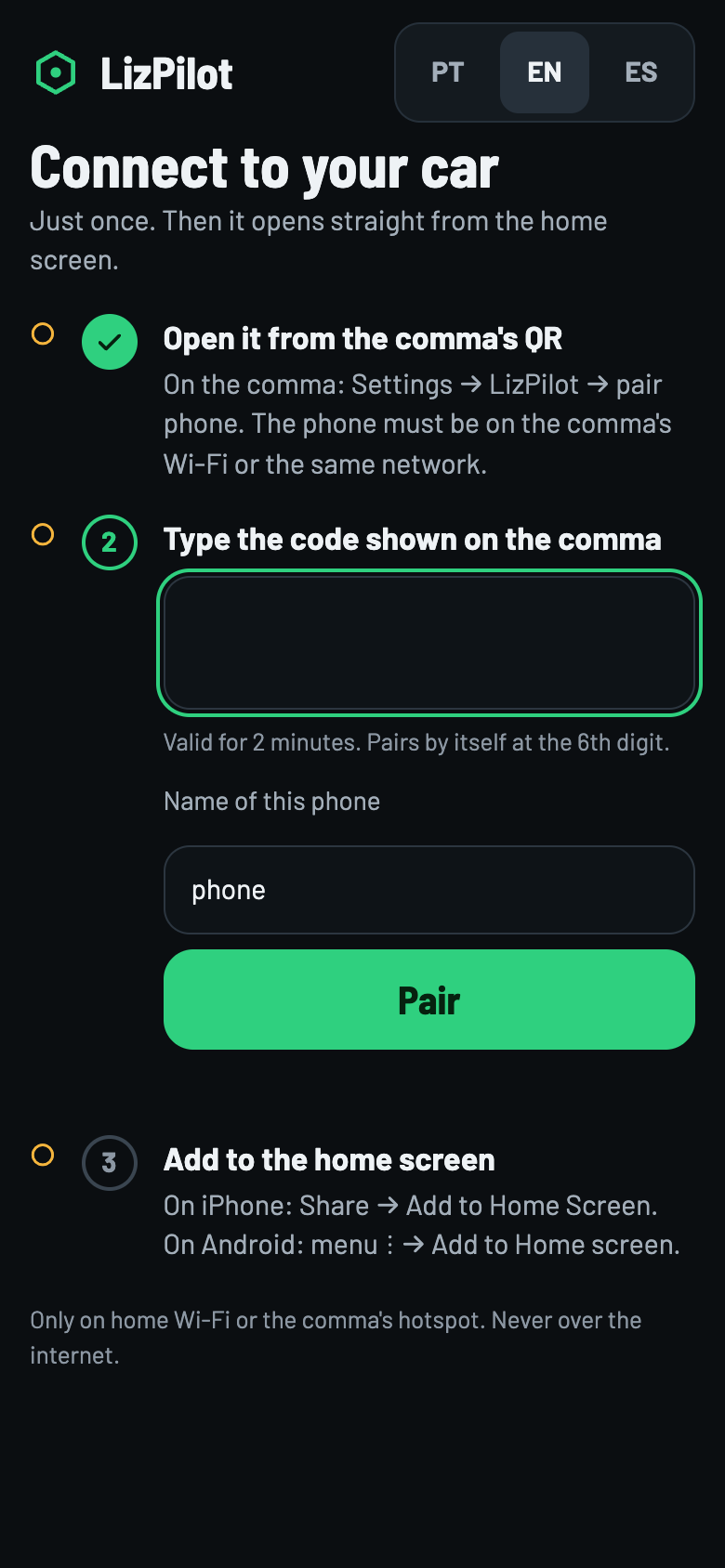
Never over the internet
The QR only works on home Wi-Fi or the comma's hotspot. Over mobile data, the panel doesn't open.
The lizpilot.local address
The comma's numeric address changes when it switches networks. The fixed name is lizpilot.local, on port 8088: http://lizpilot.local:8088.
When the phone can reach that name, Settings → Phones shows the button Open by the fixed address. There you pair once more and add it to the home screen again.
Up to 5 phones stay paired; a sixth one replaces the oldest. On the comma, disconnect phones (desconectar celulares) removes them all.
3 · Home
The first screen
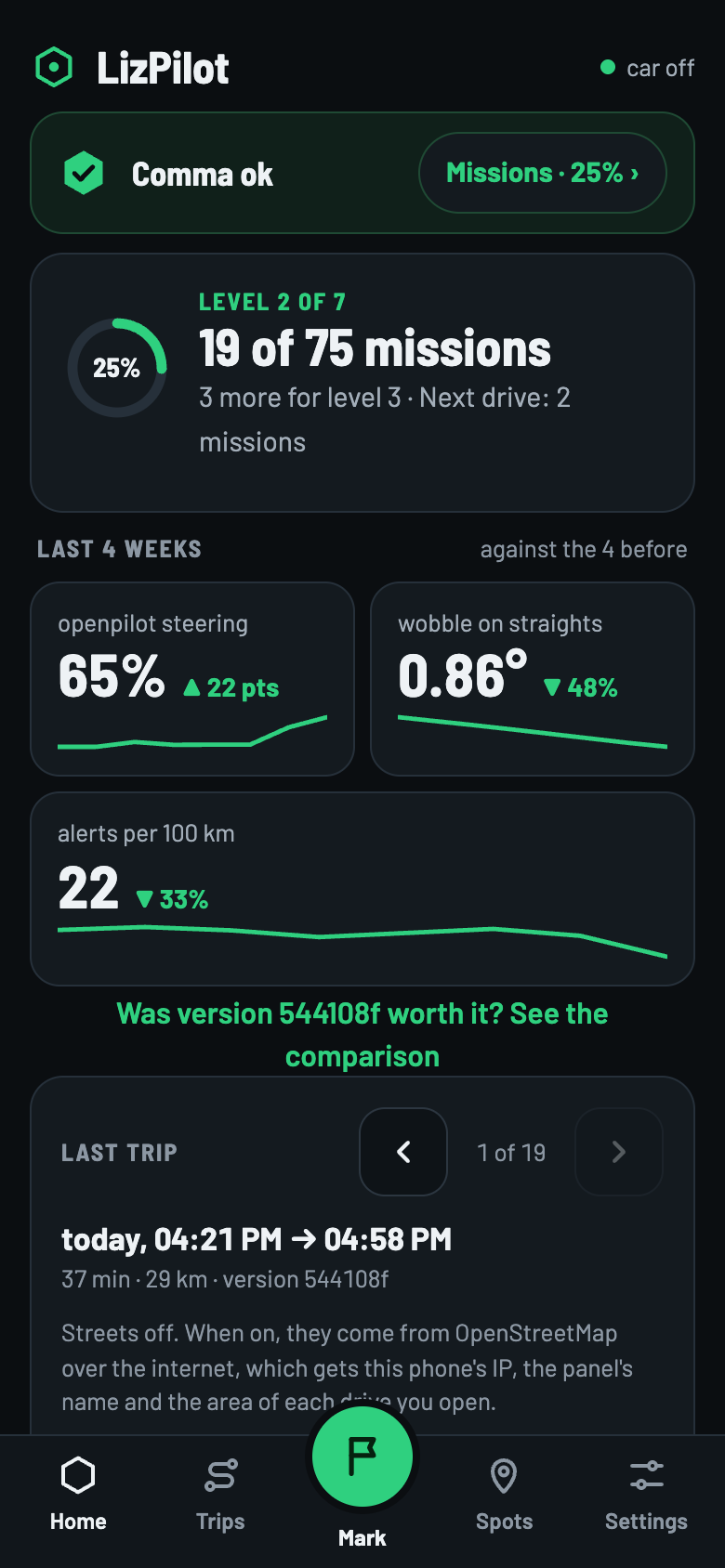
Swipe to see the others ›
Comma ok
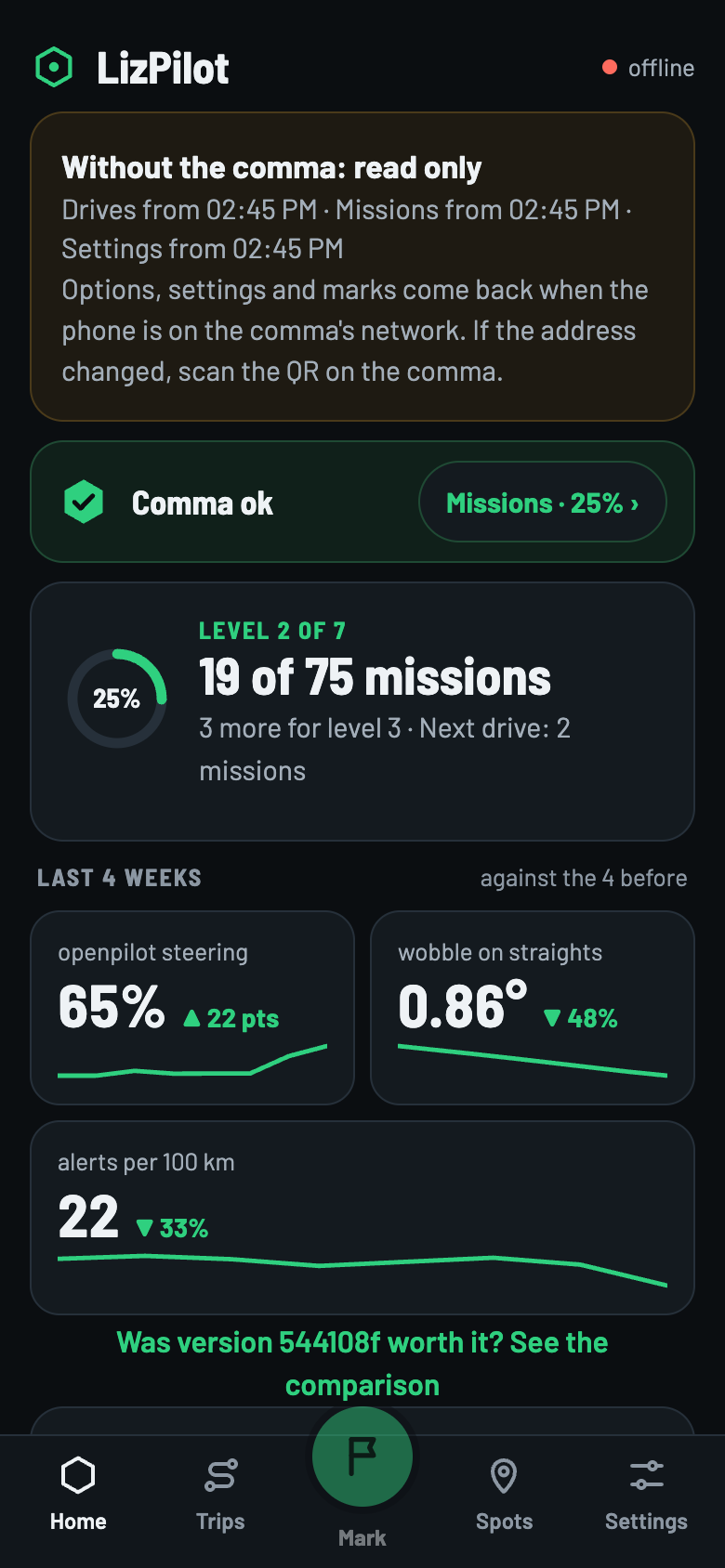
The green card says whether the comma is fine. The Missions · 26% › pill takes you to the Missions. Right below are the level and how many missions go on the next drive.
Last 4 weeks
Three numbers, against the 4 weeks before:
- openpilot steering
- The share of the time moving in which openpilot steered without your hand helping.
- wobble on straights
- How much the wheel goes back and forth around its own average, on straights only (wheel under 3° for 3 s), with openpilot steering above 20 km/h. Lower is better. Curves are not measured.
- alerts per 100 km
- How many alerts openpilot gave, by distance.
With less than 30 km in the 4 weeks, the numbers don't show: they say too little. The wobble needs 30 s of straights.
Why there is no “km per intervention”
Counting the hand on the wheel, every touch becomes an intervention, and the number sits at 0.05 to 0.07 km. Counting the brake, with always-on steering it doesn't even disengage openpilot. The number only comes back once there is a definition of intervention you agree with.
Was version … worth it? compares the new version with the one before. With less than 200 km on each side, it shows the numbers without a verdict.
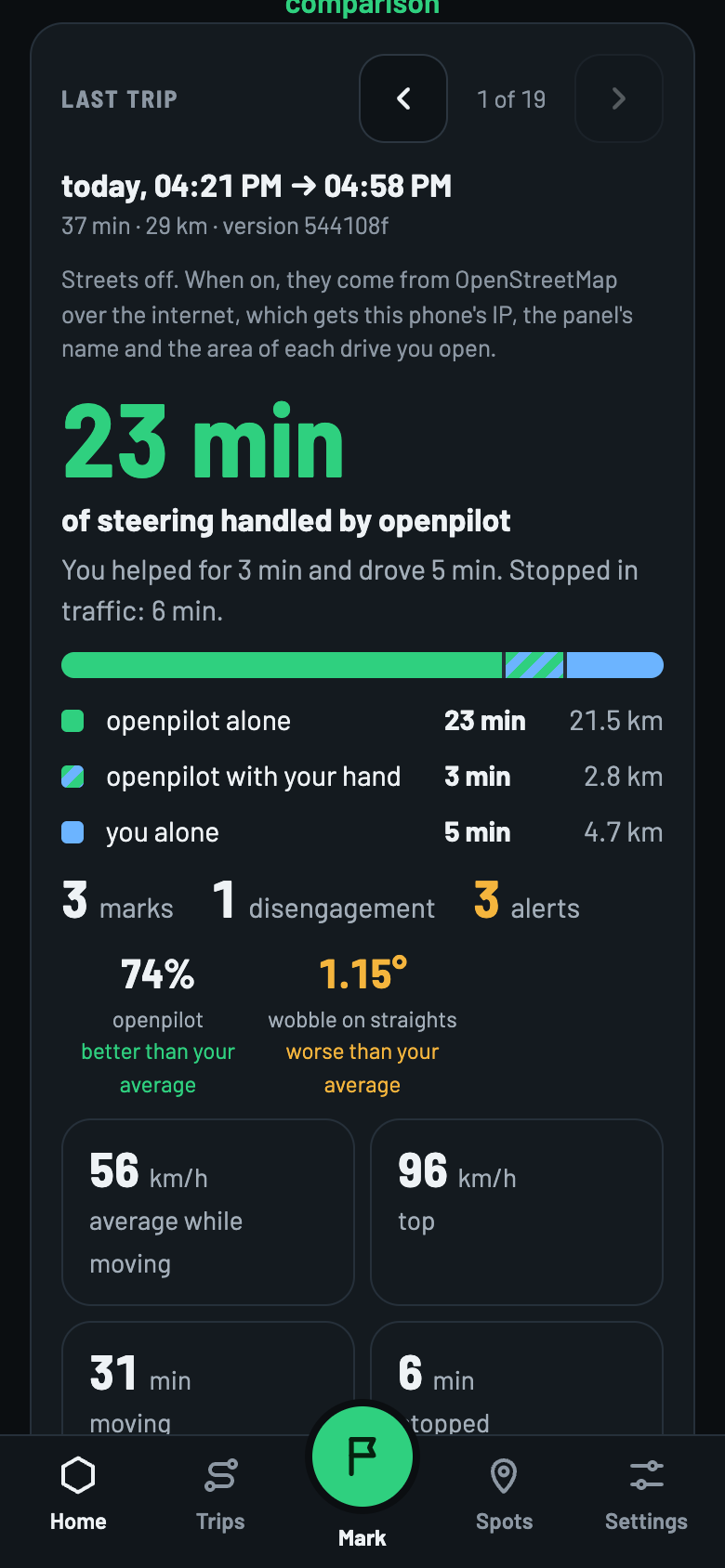
Last trip
- How much time was openpilot alone, openpilot with your hand and you alone, plus the time stopped.
- The map: green is openpilot, striped is with your help, blue is you, yellow is a mark.
- Streets come off. When on, they come from OpenStreetMap over the internet, which gets the phone's IP, the panel's name and the area of the trip you open.
- Review trip opens the replay; Hide drive takes it off the list, and the log stays on the comma.
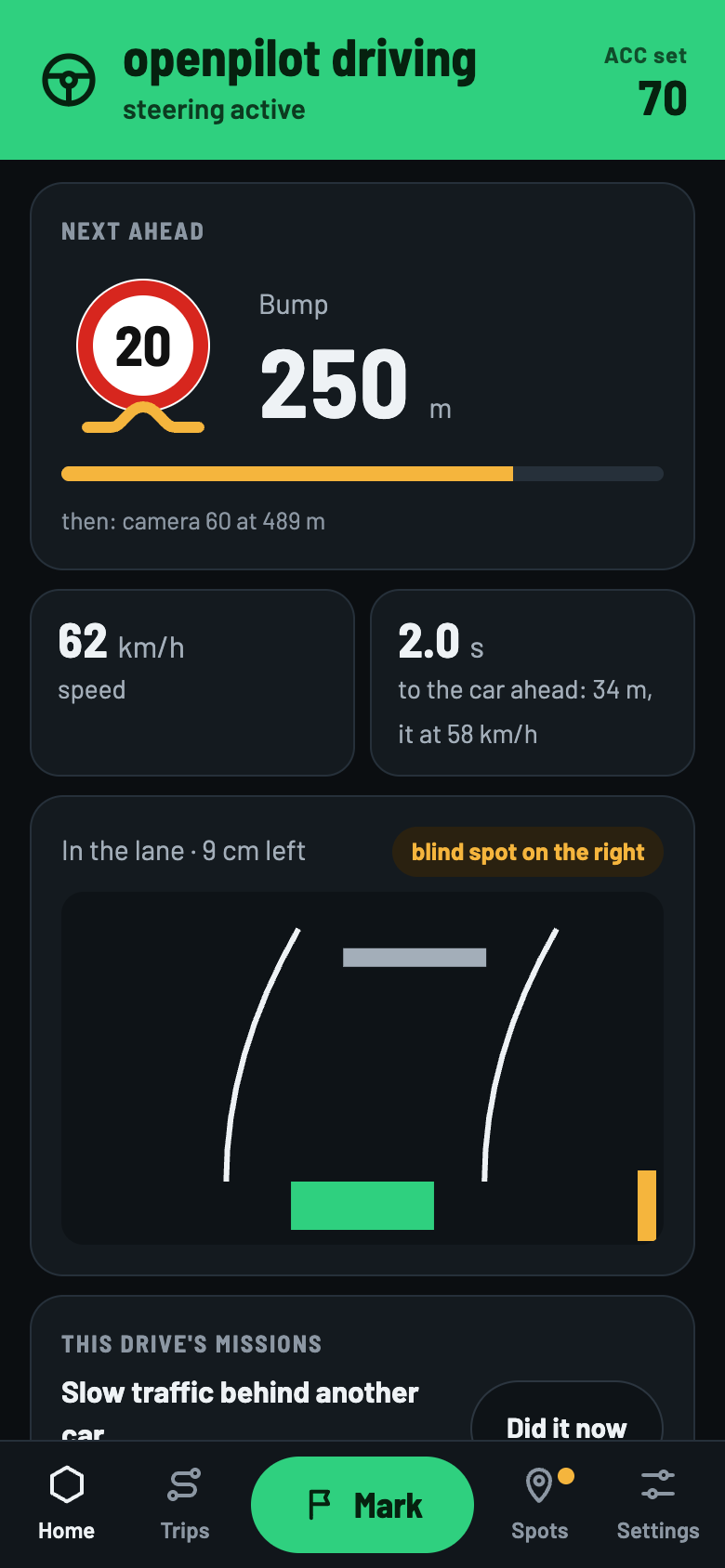
The driving screen
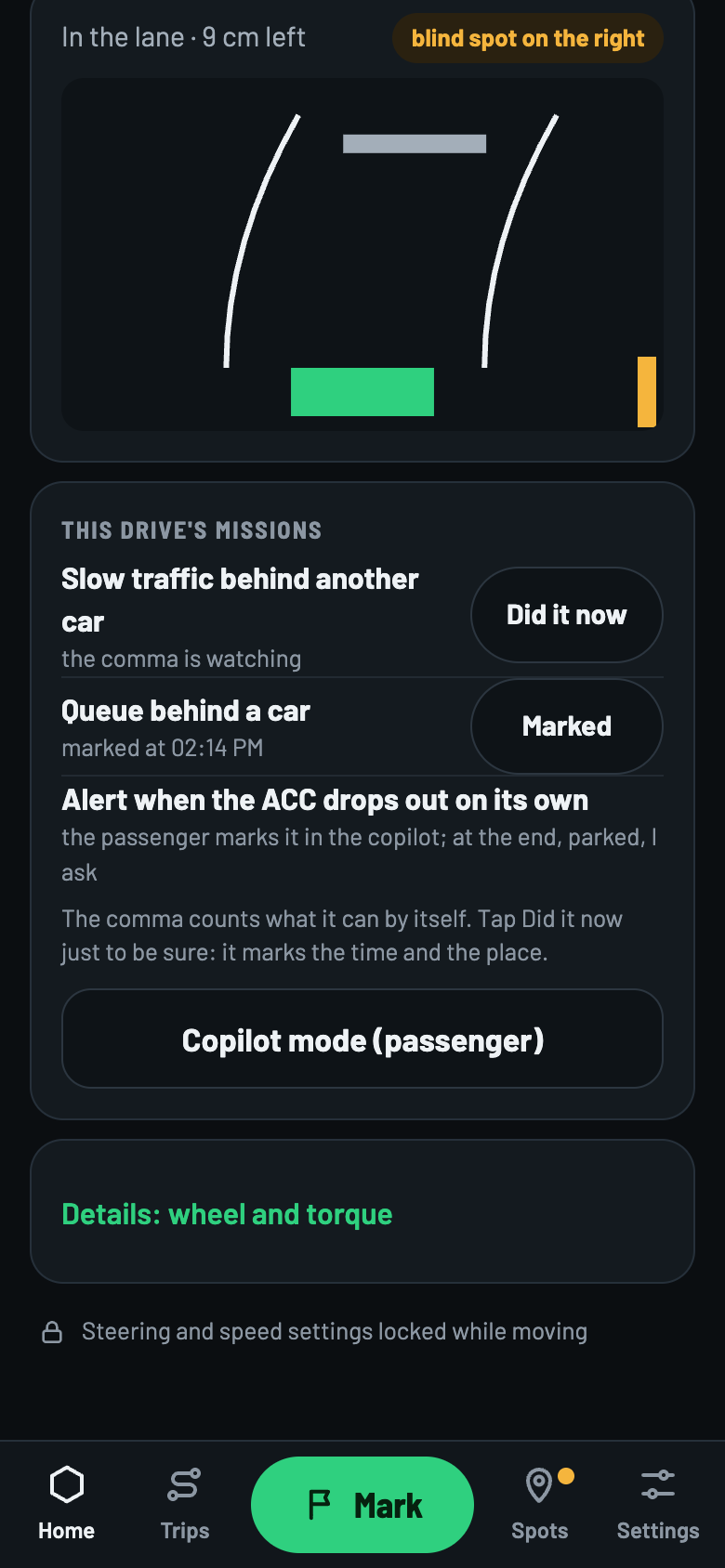
With the car on, Home becomes the driving screen: who is steering, the ACC set speed, the next speed camera or bump, the speed, the time to the car ahead, the position in the lane and the blind spot. Below come This drive's missions.
Steering and speed settings are locked while moving.
4 · Trips and Missions
The history and the tests
Trips
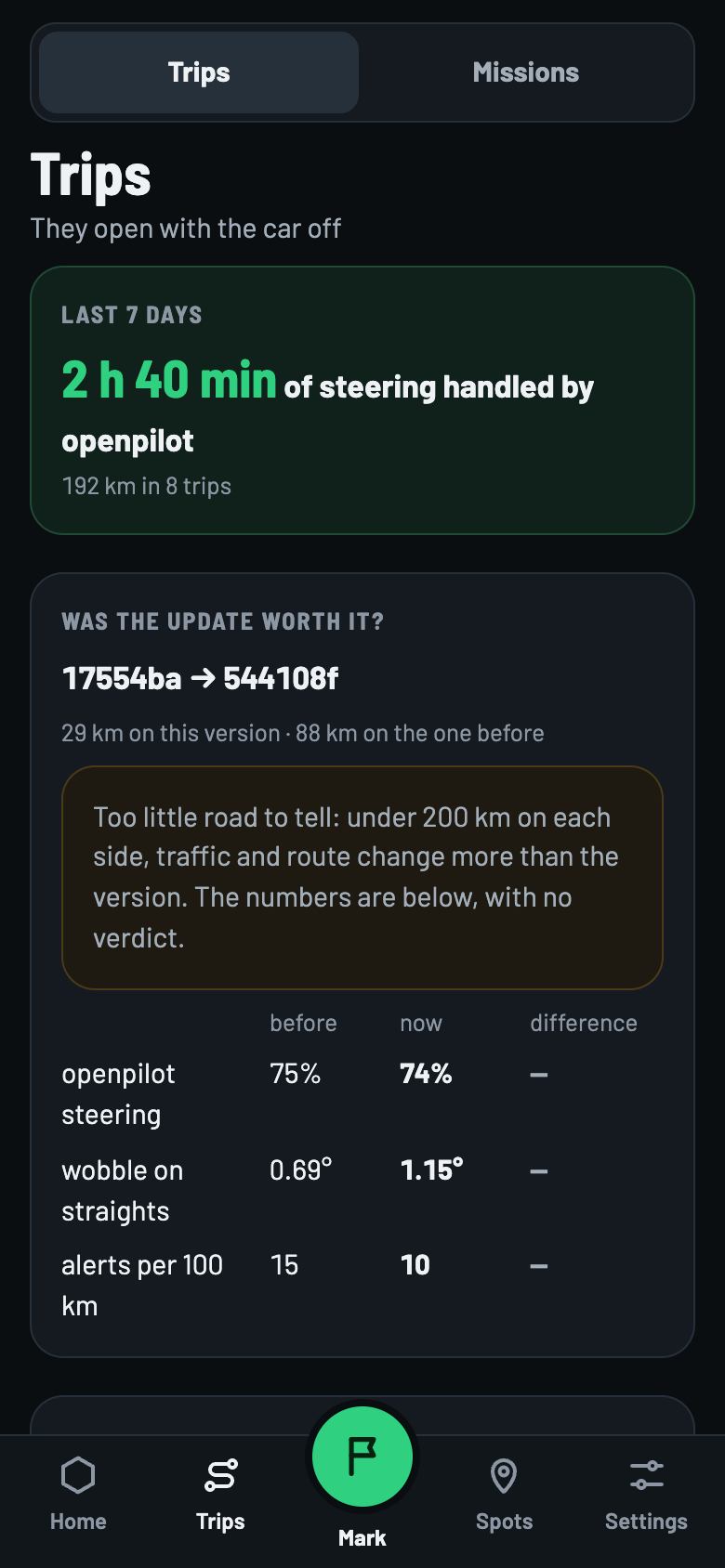
- They only open with the car off. Reading the logs is heavy for the comma.
- They show the last 7 days, Was the update worth it?, performance by week, totals and the list by version.
- Replay by minute opens straight at the marked moments.
- In Marks, classify the flags without a reason and edit the others.
- To hide a trip, slide it to the left. The log stays on the comma.
Missions
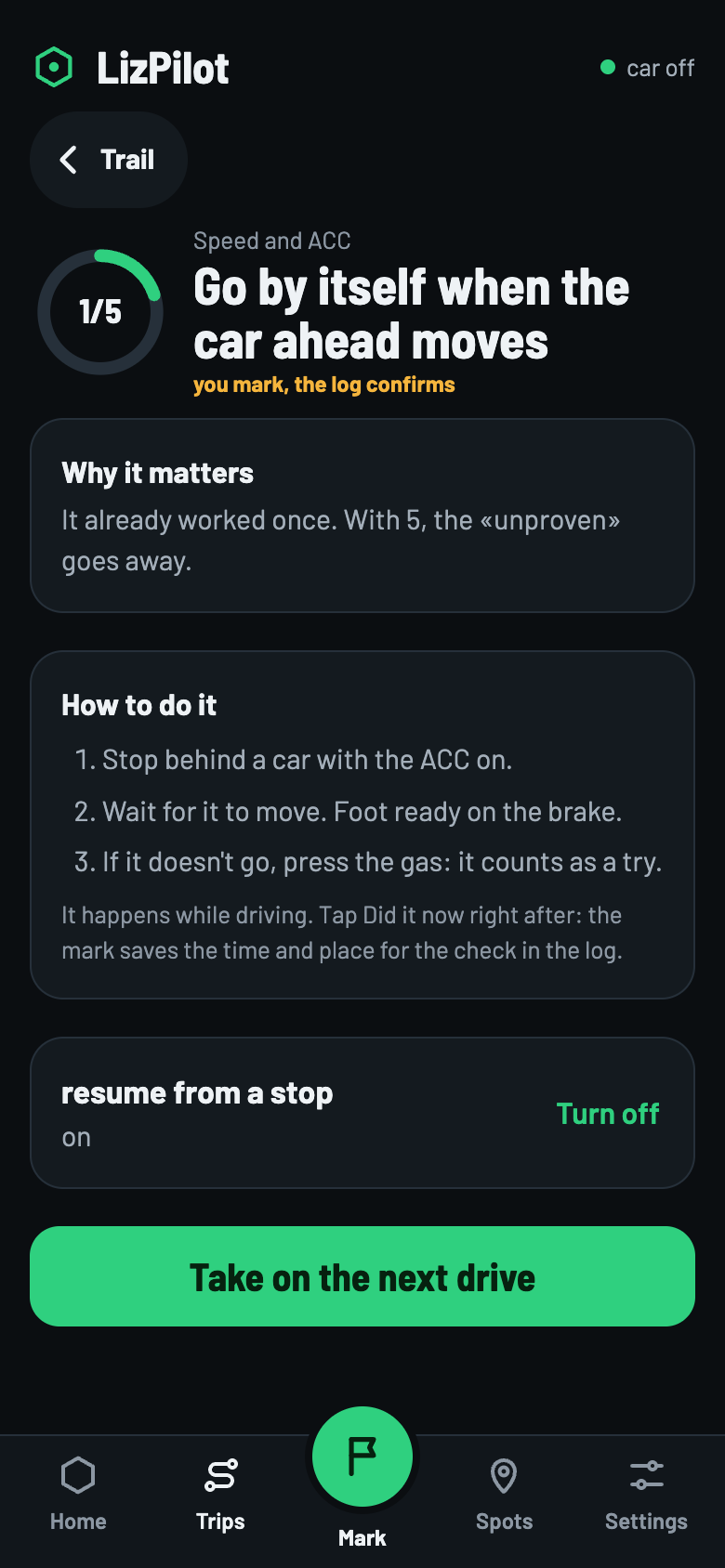
Each mission is a test that makes LizPilot more reliable. They are in Trips → Missions, or in the pill on Home.
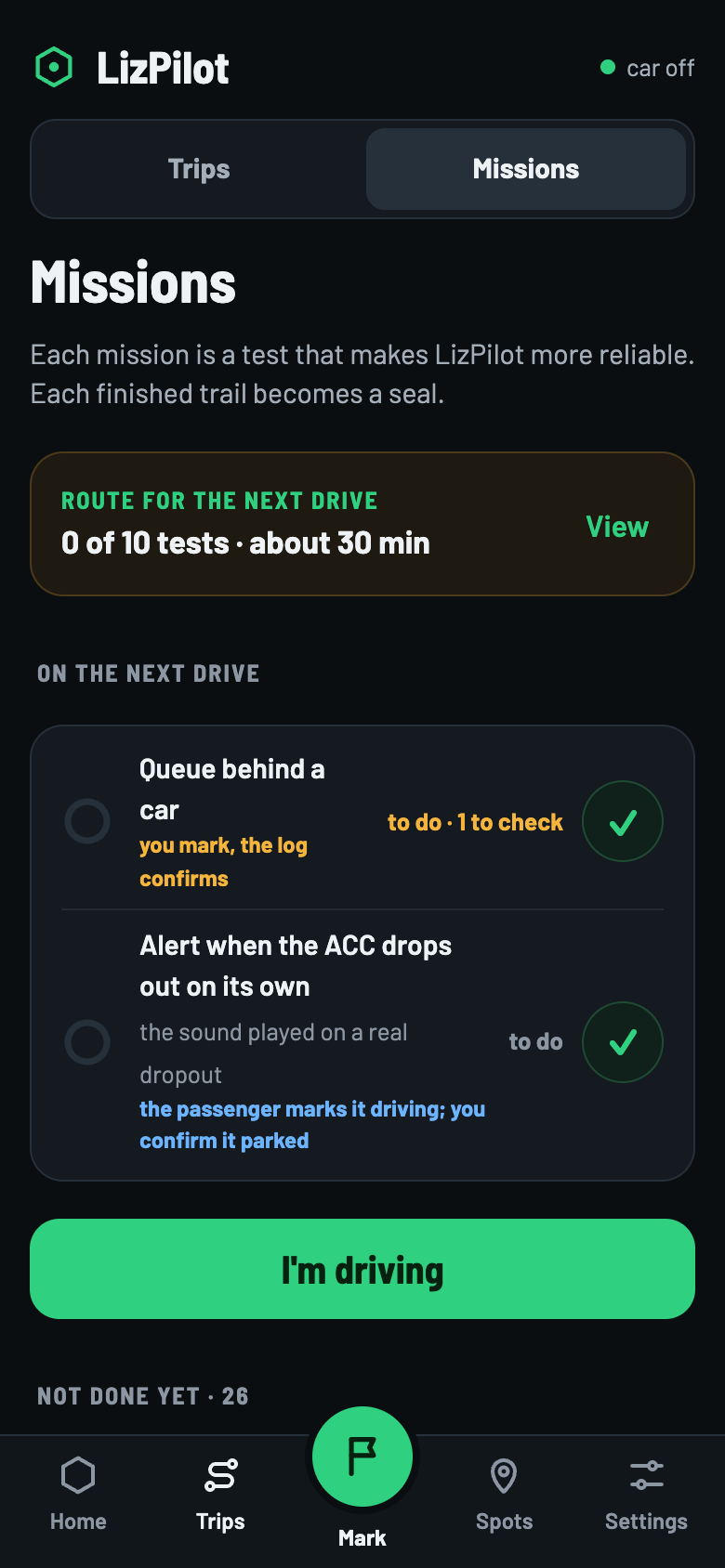
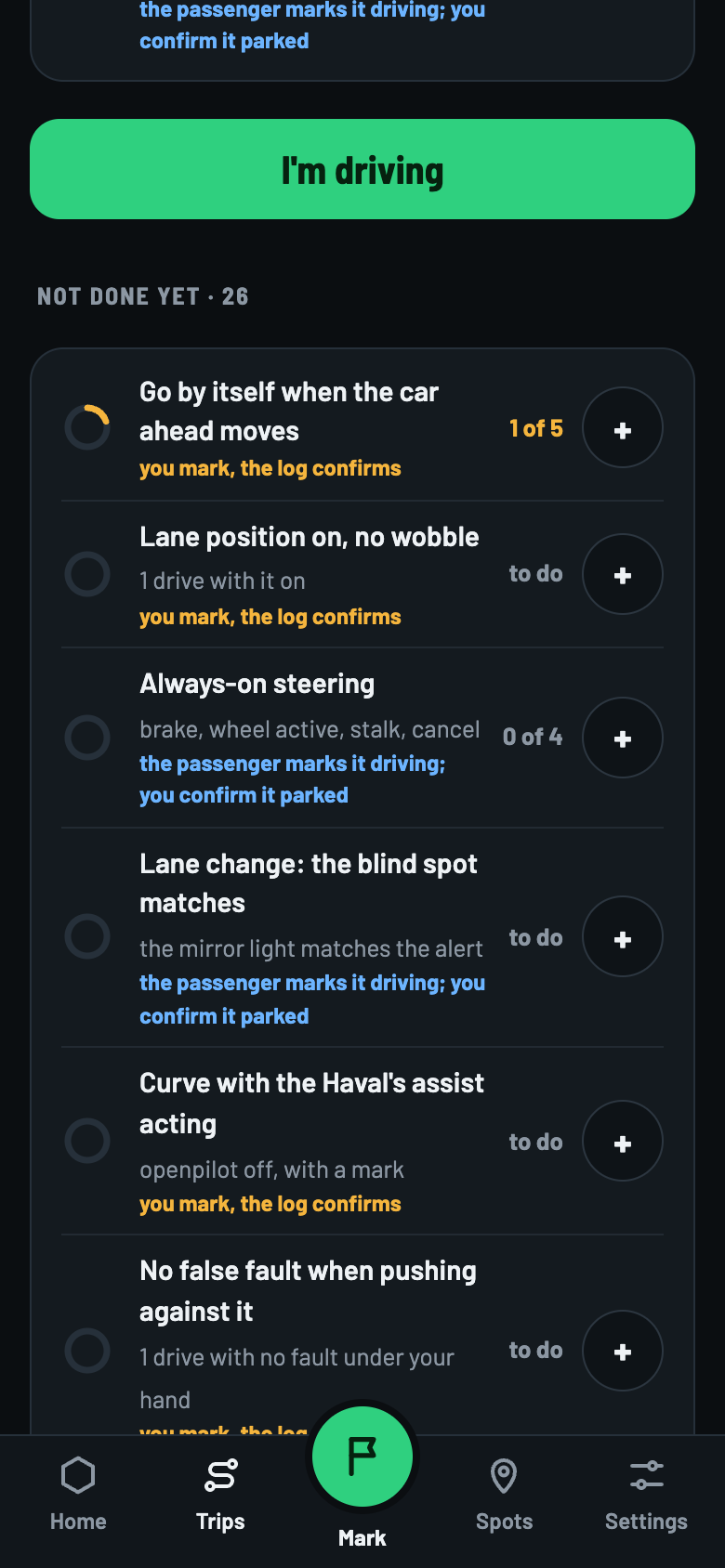
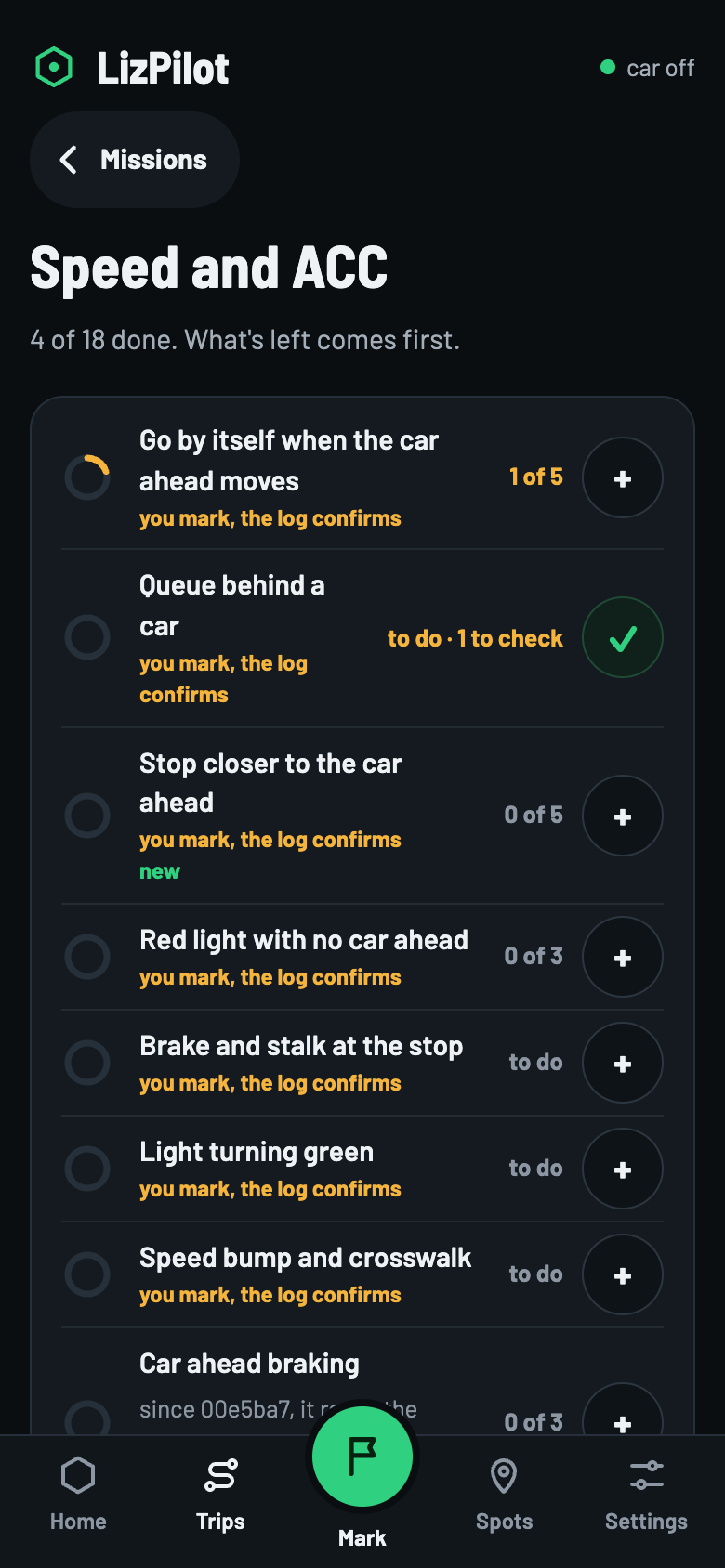
Swipe to see the others ›
- Trails: 8 groups, like Steering or Speed and ACC. A complete trail becomes a seal.
- Levels: 1 to 7, numbers only. The level belongs to LizPilot: it says how much of the catalog has been tested and unlocks nothing in the car.
- Next drive: tap + next to each mission to take it; it turns into ✓. Up to 12 per drive.
- Not done yet: the list of every open mission that goes on a drive, from any version. Each one stays until it's proved.
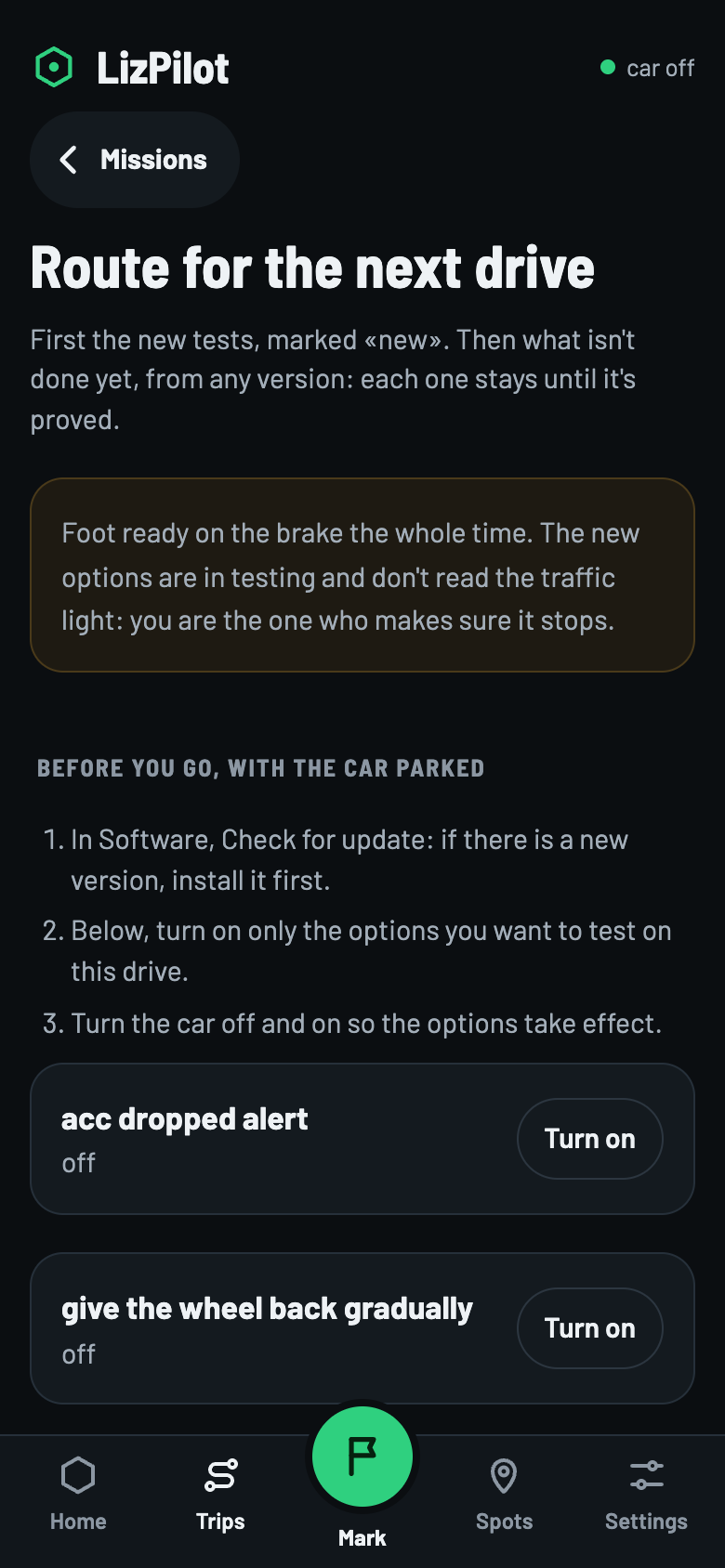
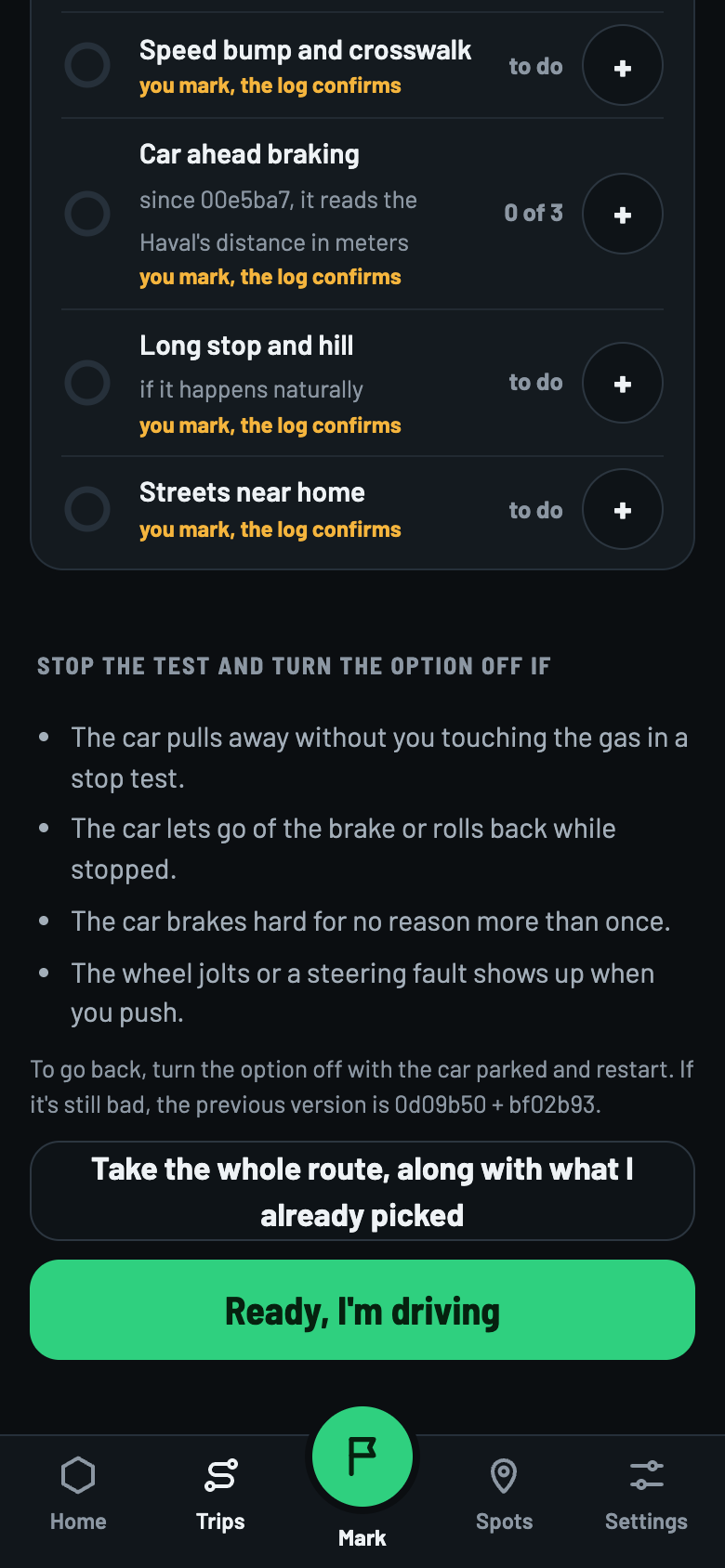
- Route for the next drive: a single route. First the new tests, marked new; then what isn't proved yet. It says what to do before leaving, stopped; when to stop the test; and how to go back.
- The route goes along with what you already picked, never in its place: Take the whole route, along with what I already picked. If it doesn't all fit, the button becomes Take what fits of the route and says how many fit.
- A mission proved after you picked it leaves the drive by itself.
- If a mission needs an option, turn it on from the mission itself, with the car stopped.
How each mission gets done
- the comma recognizes it
- The phone sees it in the trip summaries, by itself.
- you mark, the log confirms
- It happens while driving. Did it now keeps the time and the place to be checked in the log.
- you do it, parked
- Your answer is kept on the comma.
- the passenger marks it driving; you confirm it parked
- At the end of the drive, parked, the phone asks how it went.
- measured in the log
- It completes when the measurement in the log confirms it.
- your decision
- Not a test: it's your choice.
On the drive
- Parked, tap I'm driving. The phone keeps the starting point and goes back to Home.
- While driving, the This drive's missions card shows each one. The comma counts what it can by itself. Did it now keeps the time and the place, just to be sure.
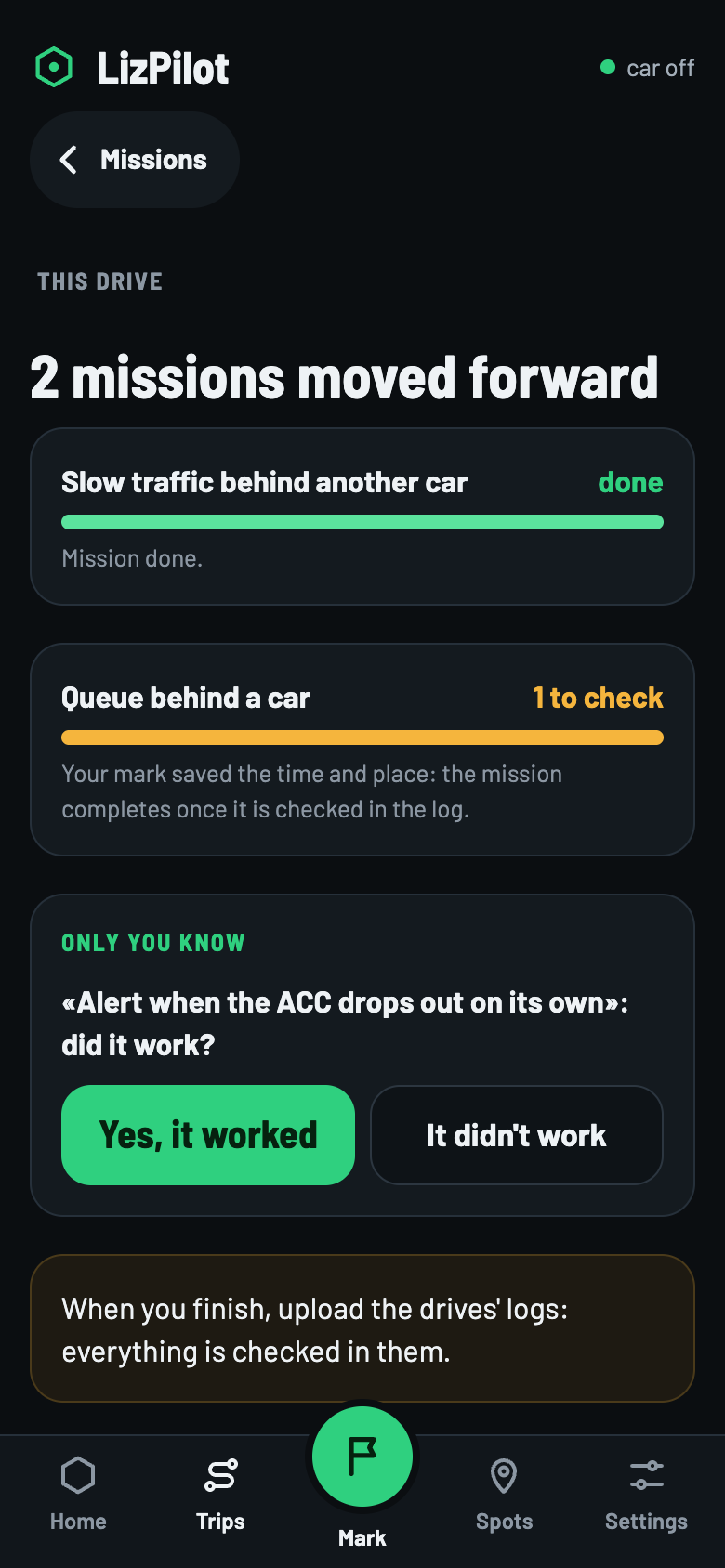
- When the car turns off and the comma summarizes the drive, Home shows The drive moved … missions forward. The Only you know questions are answered parked.
A mark doesn't complete a mission by itself
The mark keeps the time and the place; the mission completes once it is checked in the log. Until then, it shows 1 to check.
5 · Copilot mode
The passenger runs the Missions
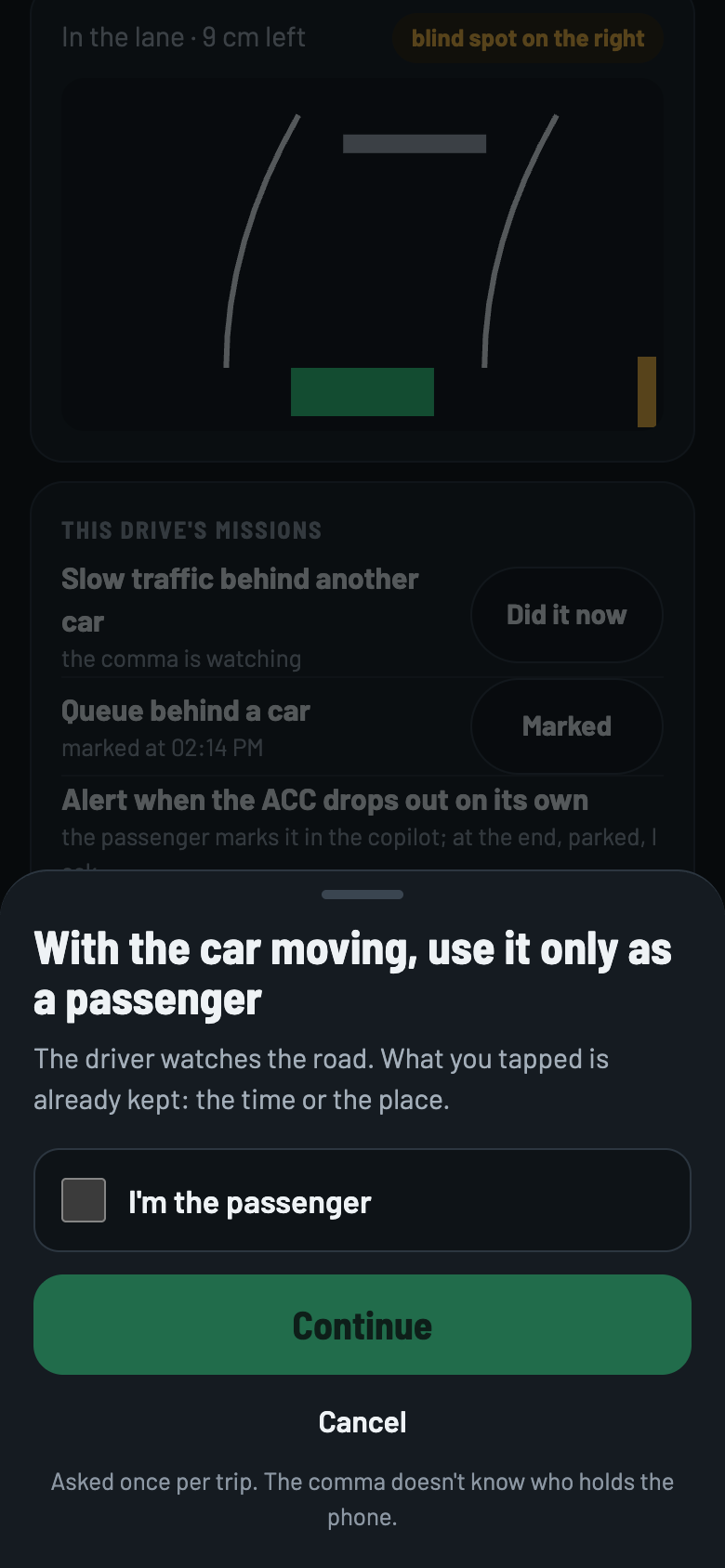
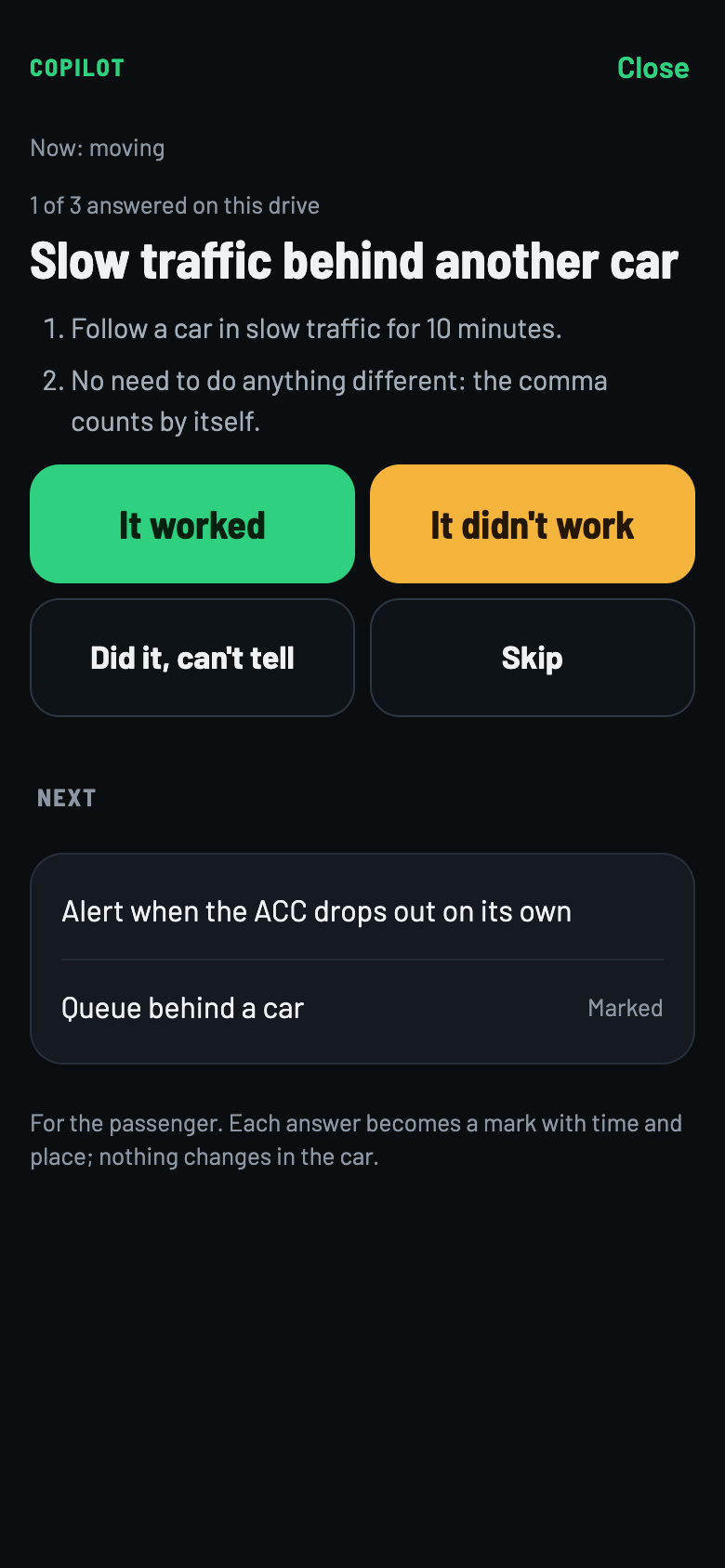
With the car on, tap Copilot mode (passenger), below This drive's missions.
Swipe to see the others ›
- The question. The copilot always asks first, once per drive, even parked: check I'm the passenger. The comma doesn't know who holds the phone: it's a reminder, not a lock.
- One mission at a time. The ones that fit the moment come first, with You can do it now (for example: stopped behind a car, slow traffic). If the comma's live data stops, it doesn't say “now”.
- The answer. It worked, It didn't work, Did it, can't tell or Skip. Each answer becomes a mark with time and place. Nothing changes in the car.
- “It didn't work” stays as didn't work · to check, never as progress.
- For “only you know” missions, the answer while driving becomes a mark. At the end, parked, the phone asks again, and only that answer counts.
- The copilot closes by itself when the car turns off, or when it moves with no passenger confirmed.
Stop the test if…
For the route's missions that turn on an option, the copilot shows when to stop and the Stop the test button. It marks, and the notice says the rest: once the car is stopped, turn the option off and restart.
6 · Mark, Spots and Settings
What each one does
Mark
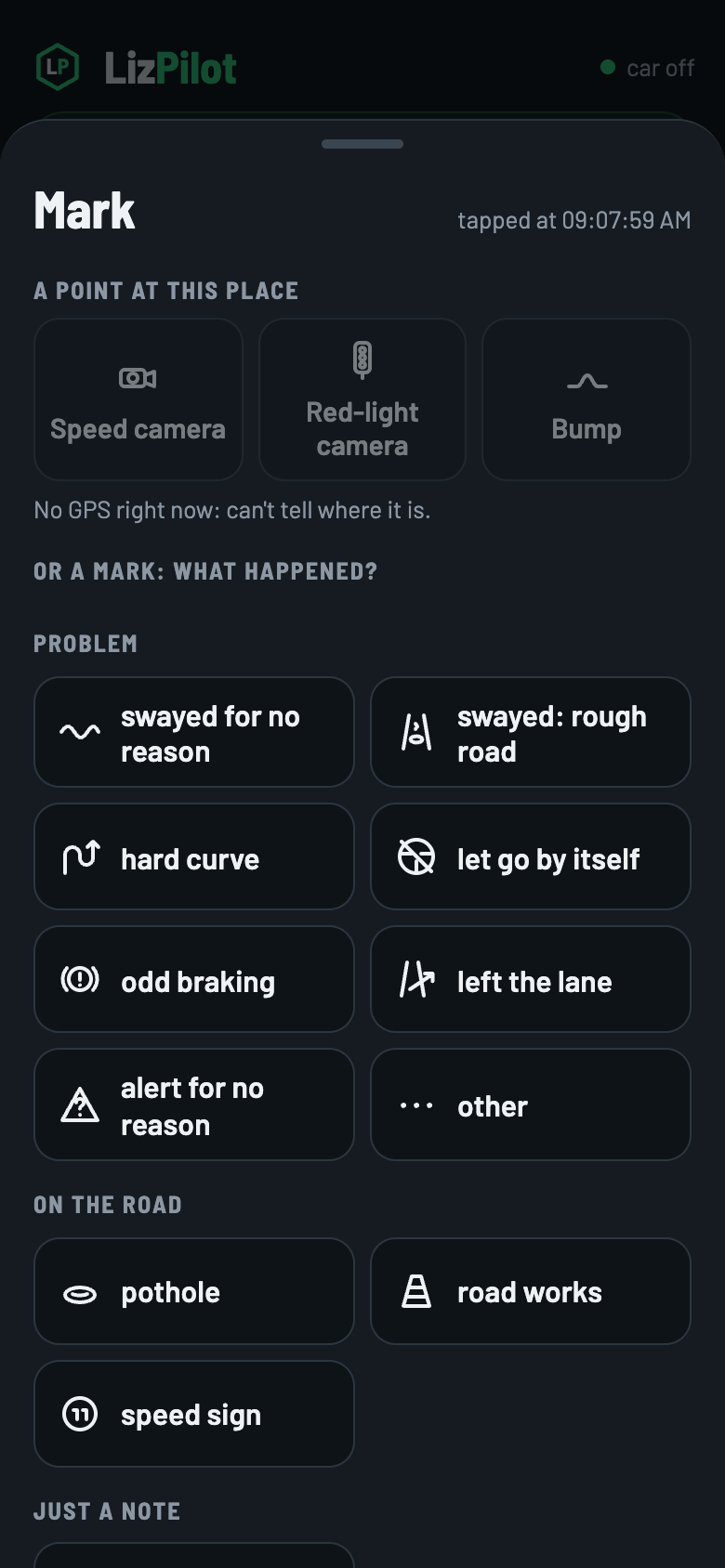
- The middle button. The time is taken at the tap.
- Choose the reason, like swayed for no reason or odd braking. The comment is optional and can be dictated with the keyboard's microphone.
- The mark only counts after Save. Then it raises the comma's flag, and the time and place are saved to check in the log.
- A flag pressed on the comma itself shows up on the phone as without a reason, to classify later, parked.
- While driving, only the passenger marks: the phone asks once per drive.
Spots: speed cameras and bumps
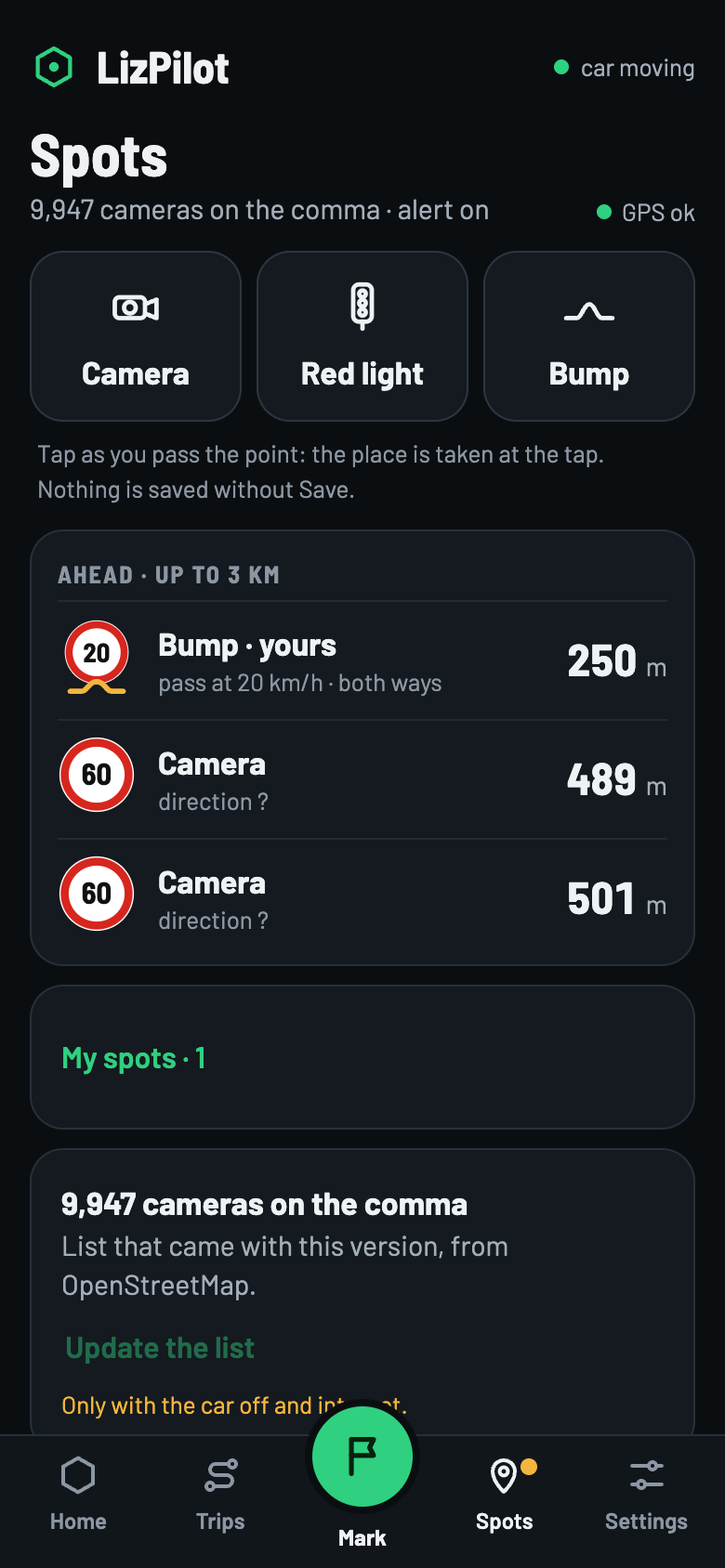
- Tap Camera, Red light or Bump as you pass the spot. The place is taken at the tap, and nothing is saved without Save. It needs GPS.
- The list of speed cameras comes with the version, from OpenStreetMap. Update the list only with the car off and with internet.
- The speed camera and bump alert only warns: it doesn't slow down by itself.
- Slow down for bumps testing taps the ACC's − down to the speed you chose, from 30 km/h up. Below that, it only warns.
Settings
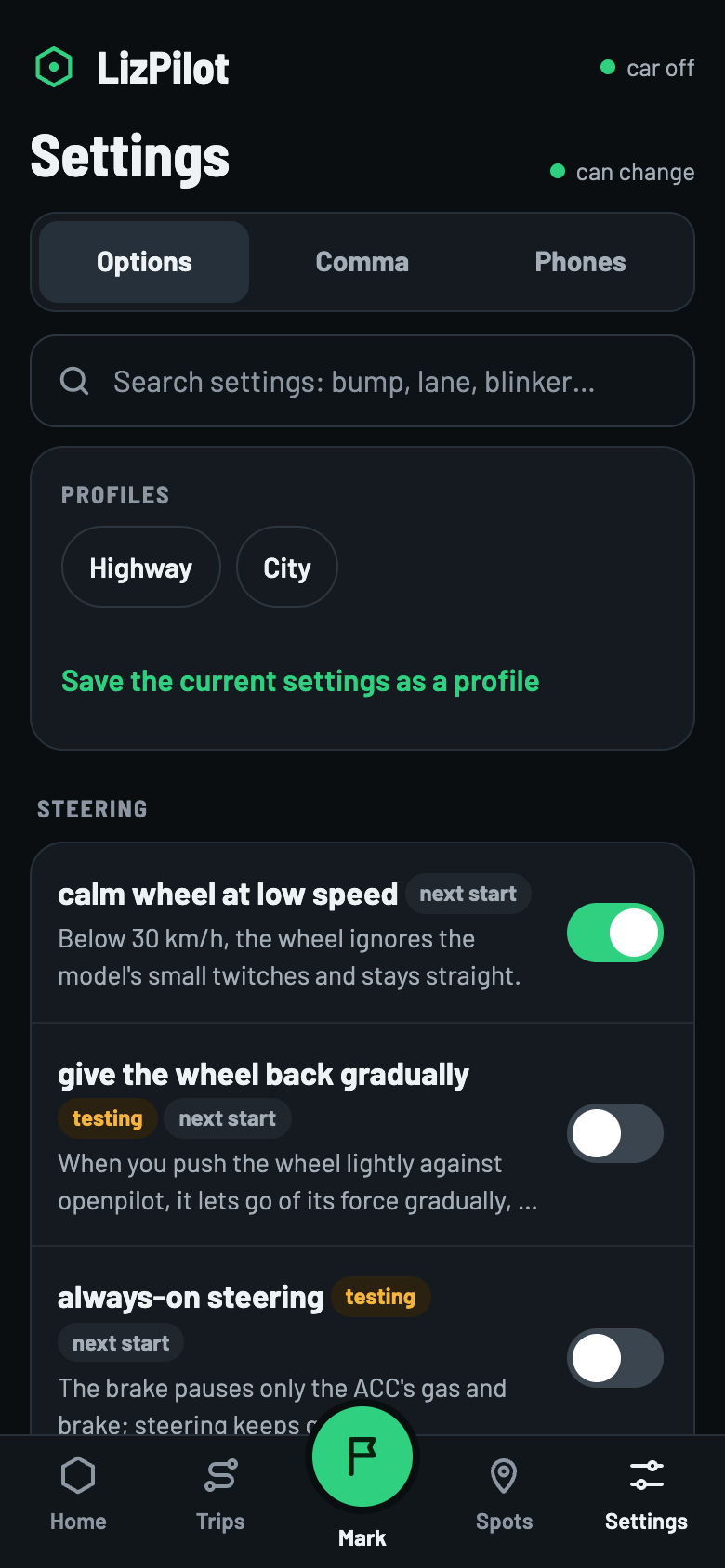
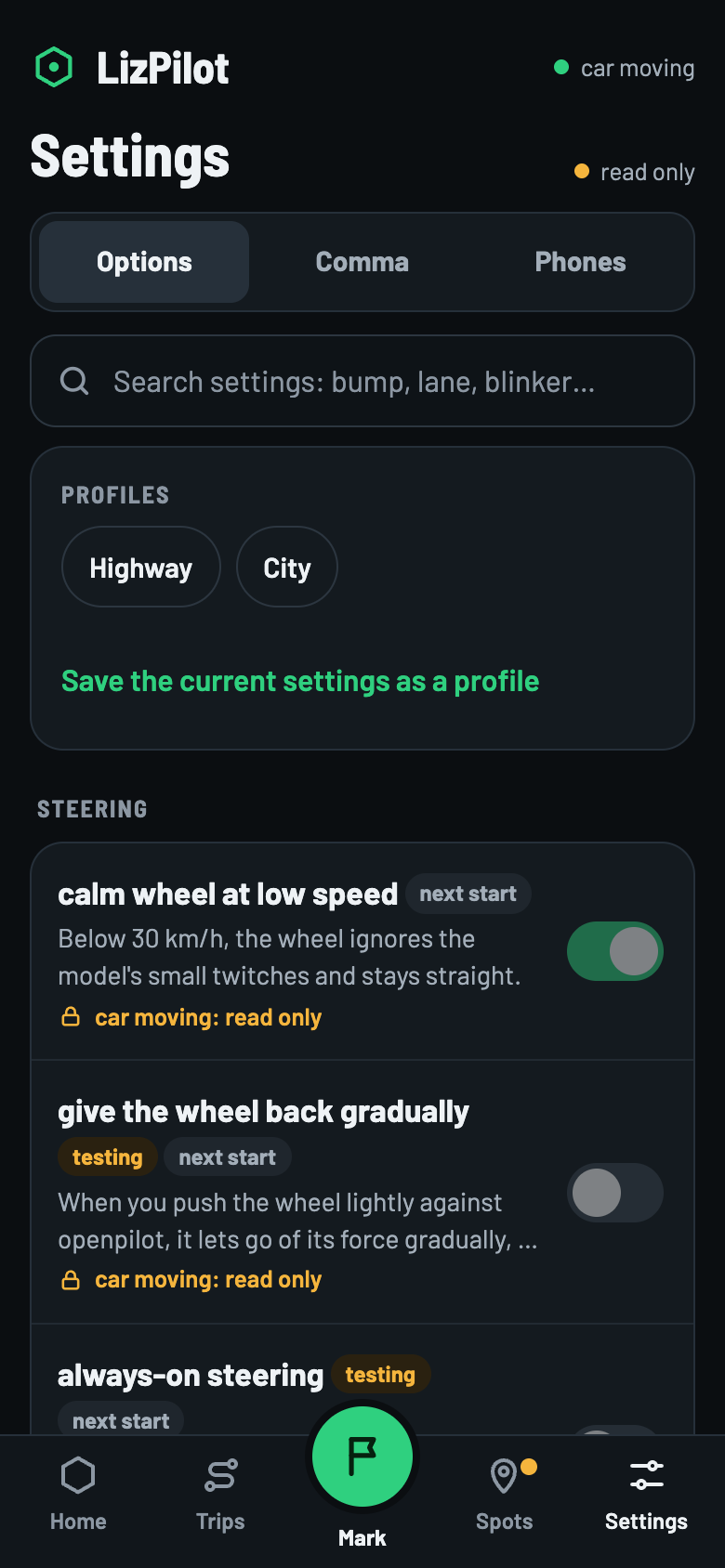
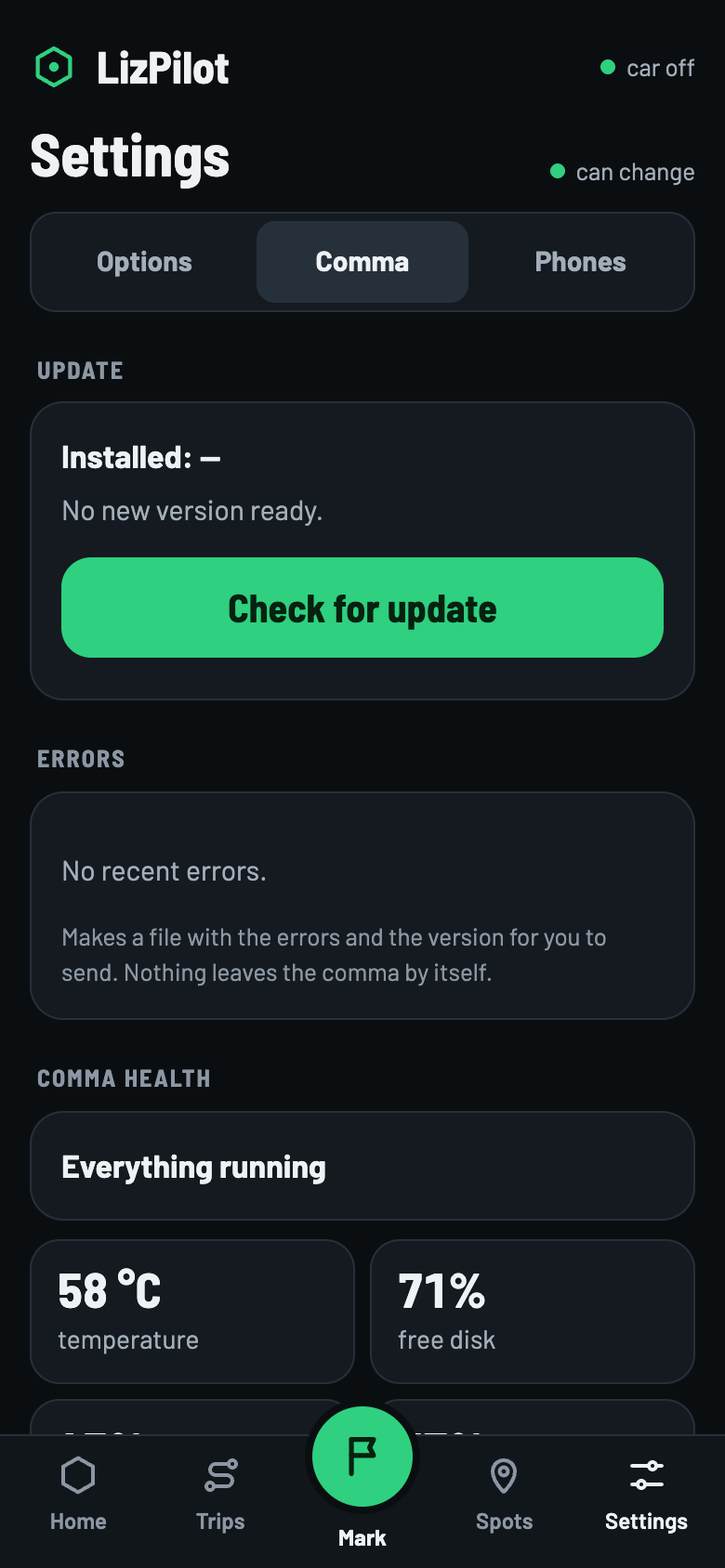
Swipe to see the others ›
- Options
- Steering, speed, alerts and phone. Each one says when it takes effect (next start) and whether it is testing. Profiles like Highway and City keep a set of options.
- Comma
- Update, errors (makes a file for you to send; nothing leaves the comma by itself), health, what the car has learned, a copy of the settings in a file on the phone, and the list of who changed what.
- Phones
- Language (PT, EN, ES), paired phones, this phone's address and the data kept on it.
Only with the car stopped
- Steering and speed options and profiles: only with the car in P or off.
- Updating the comma, opening trips and the replay: only with the car off.
- Some options only change on the comma, like phone panel.
7 · The copy on the phone
What stays on the device
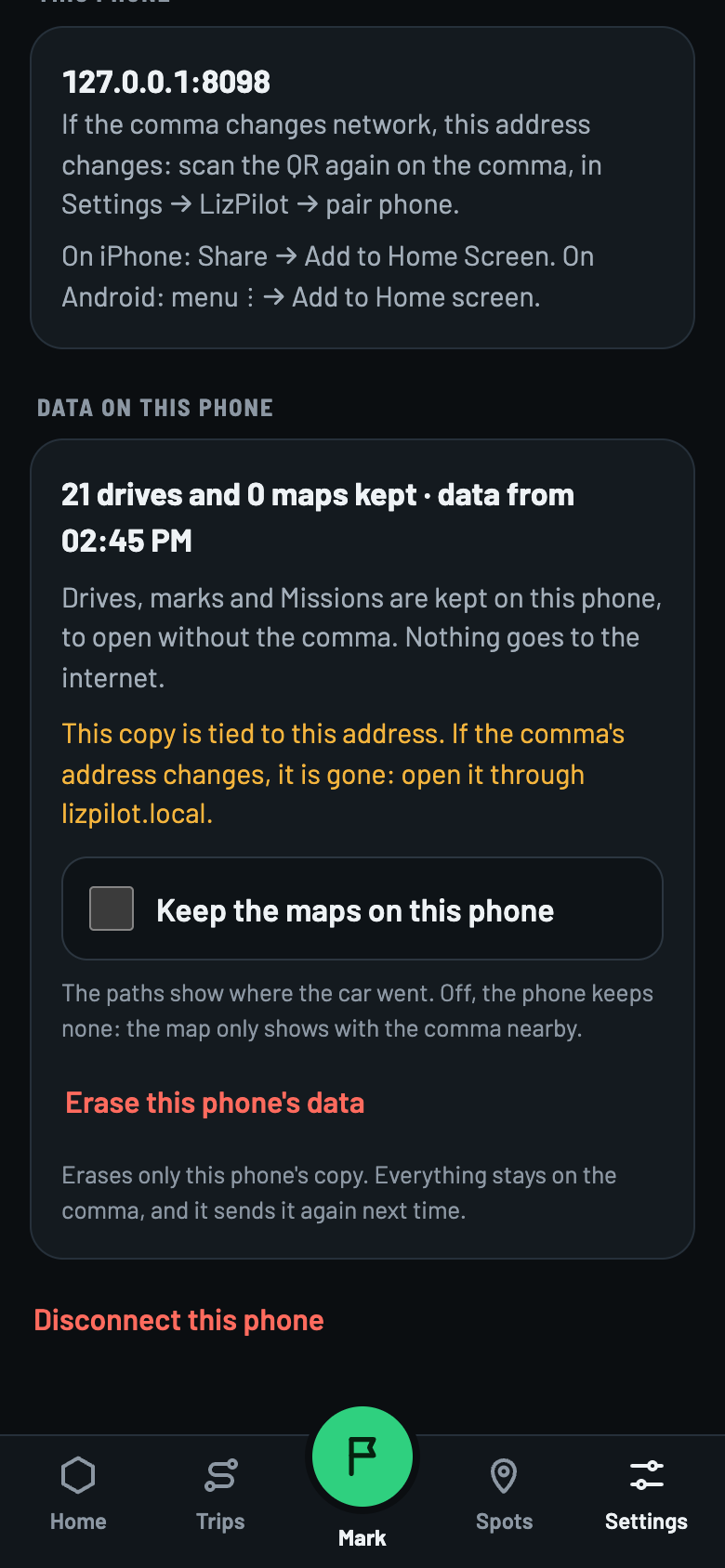
- Kept
- Trips and summaries, marks, Missions and a read-only copy of the settings. Nothing goes to the internet.
- Not kept, by default
- The maps. Keep the maps on this phone comes off: the paths show where the car went. Off, the map only shows with the comma nearby.
- Without the comma: the Without the comma: read only banner shows what time the data is from. Options, settings and marks come back when the phone is on the comma's network.
- Missions queue: away from the comma, choosing, removing or taking the route waits in a queue on the phone and goes when the comma shows up. Whatever the comma refuses comes out with a notice. Only missions go in the queue.
- When it comes back, the phone asks only for what's new.
- Erase this phone's data erases only the phone's copy. Everything stays on the comma, and it sends it again next time. Disconnect this phone also erases the copy.
- The copy is tied to the address. If the comma's address changes, it's gone: use lizpilot.local.
Not yet tested on a real phone: over today's http address, the phone may not open the page from scratch away from the comma. With the page already open, the copy works.
8 · Safety
On one page
Foot ready on the brake, all the time
The new options are being tested and don't read the traffic light. Making sure the car stops is up to you.
- While moving, the phone belongs to the passenger. The driver watches the road.
- While moving, the phone changes nothing in the car. Steering and speed options only change with the car in P or off, and take effect on the next start.
- New options start off. Only calm wheel at low speed, already approved, comes on.
- Stop the test if… the route says so. Turn the option off with the car stopped and restart.
- Going back a version is only through the channel. The phone only offers the h6gt version. To go back, the previous version returns to the channel with your OK, and you install it in Settings → Comma → Update.
- Don't uninstall openpilot to change versions. Uninstalling erases logs, calibration and learning.
- Never over the internet. Only home Wi-Fi or the comma's hotspot. Over today's http address, another device on the same network could pretend to be lizpilot.local and read the phone's copy and the pairing code. So, no third-party Wi-Fi.
- Missions, levels and seals unlock nothing in the car. A mark never completes a mission by itself: it waits to be checked in the log.
9 · Common problems
When something goes wrong
No connection
- Check that the phone is on the same Wi-Fi as the comma or on its hotspot. Mobile data won't do.
- Check on the comma that phone panel (painel no celular) is on.
- If the comma switched networks, its numeric address changed. Open it through lizpilot.local or read the QR again.
- Meanwhile, the copy shows what it already had, read only.
The QR doesn't open
- The phone must be on the same network as the comma before reading the QR.
- The code is valid for 2 minutes. After 5 wrong codes, it's cleared. Tap pair phone (parear celular) again.
- pair phone only shows with phone panel on.
- Without a camera, type in the browser the address shown on the comma's pair phone button, after “abra” (“open”).
Which version is on the comma
- Settings → Comma → Update shows the installed one. Each trip also shows its version.
- A downloaded version only counts after Install and restart. Check the installed one before saying a fix worked.
- Update only with the car off.
The Missions card doesn't show
- It shows after the comma has sent the Missions once. With no connection, the Missions screen says No connection to the comma.
- A comma on an old version has no Missions. Update through the channel.
- The way in is the Missions · N% › pill on the Comma ok card, and Trips → Missions.
Others
- Trips don't open: only with the car off.
- A setting looks locked: the car is moving, the comma is away, or the option only changes on the comma.